 Edited by
Short answer
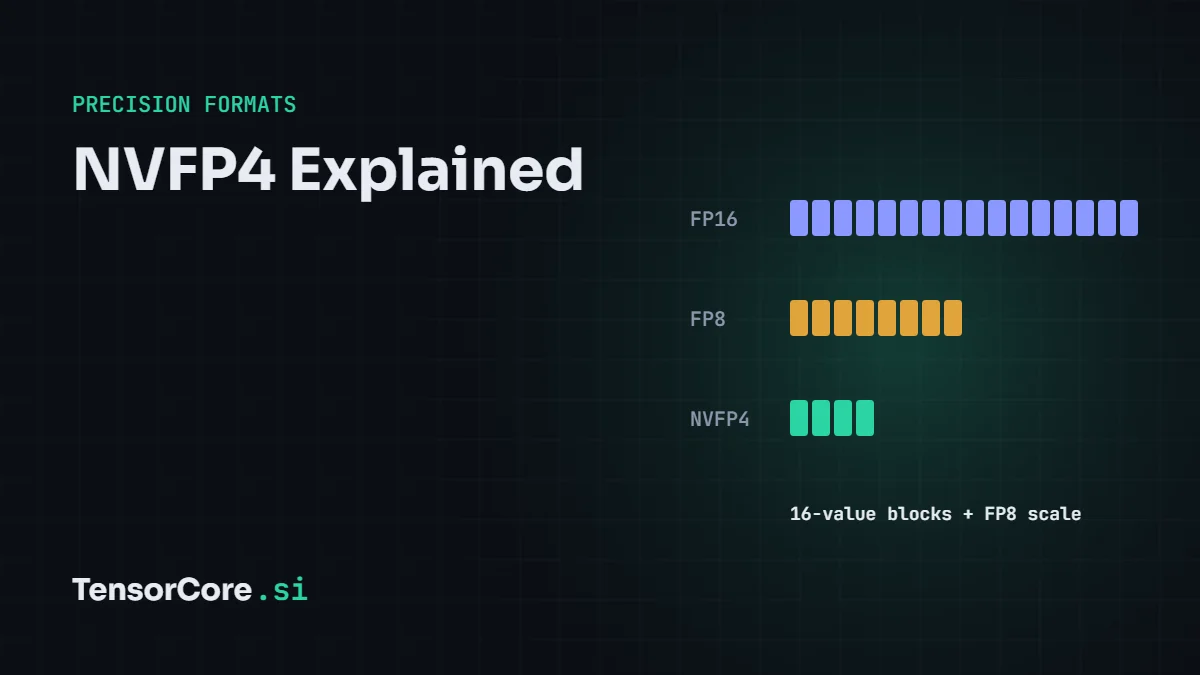
NVFP4 is NVIDIA's 4-bit floating-point format for Blackwell GPUs. Each value is an FP4 E2M1 number (1 sign, 2 exponent and 1 mantissa bit), every block of 16 values shares an FP8 (E4M3) scale, and each tensor gets one more FP32 scale. That averages about 4.5 bits per value, roughly 3.5 times smaller than FP16 and 1.8 times smaller than FP8, and NVIDIA reports 1% or less accuracy loss versus FP8 on DeepSeek-R1. It differs from the open MXFP4 format mainly in using smaller blocks and finer, non-power-of-two scales.
Why 4-bit needs scaling
An FP4 E2M1 number can only represent eight magnitudes: 0, 0.5, 1, 1.5, 2, 3, 4 and 6, plus their negatives. Real model weights and activations span a much wider range, so storing them directly in FP4 would lose almost everything. The solution is to store a scale factor with each small group of values: the 4-bit numbers describe each value's shape relative to its neighbours, and the scale says how big the whole group is. Try FP4 rounding yourself in the number format converter.
How NVFP4 works
- Elements: each value is stored as 4-bit E2M1.
- Micro-block scale: every 16 consecutive values share one 8-bit FP8 E4M3 scale. Because E4M3 has a mantissa, the scale can be any value like 1.375, not just a power of two, which fits each block more tightly.
- Tensor scale: one FP32 scale per tensor shifts the block scales into E4M3's range.
value = FP4 element × FP8 block scale (per 16 values) × FP32 tensor scale
The storage cost is 4 bits per value plus 8 bits per 16 values, which is 4.5 bits on average. Blackwell's fifth-generation Tensor Cores apply the scales in hardware during the matrix multiply.
NVFP4 vs MXFP4
| NVFP4 (NVIDIA) | MXFP4 (OCP standard) | |
|---|---|---|
| Element format | FP4 E2M1 | FP4 E2M1 |
| Block size | 16 values | 32 values |
| Block scale | FP8 E4M3 (fractional) | E8M0 (powers of two only) |
| Extra scale | FP32 per tensor | None |
| Average bits per value | 4.5 | 4.25 |
| Accuracy | Higher, thanks to smaller blocks and finer scales | Slightly lower |
| Hardware | NVIDIA Blackwell | NVIDIA Blackwell, AMD MI355X and others |
Memory, speed and accuracy
- Memory: about 3.5 times smaller than FP16 and 1.8 times smaller than FP8. A 70B model drops from about 140 GB in FP16 to about 40 GB of weights.
- Speed: Blackwell runs FP4 at twice its FP8 Tensor Core rate: 9 PFLOPS dense per B200 and 13.5 PFLOPS per B300.
- Accuracy: NVIDIA reports that quantizing DeepSeek-R1-0528 from FP8 to NVFP4 with post-training quantization cost about 1% or less on key benchmarks, and even scored 2% higher on AIME 2024.
How to use NVFP4
- Quantize a model with NVIDIA TensorRT Model Optimizer or LLM Compressor, using post-training quantization or quantization-aware training.
- Deploy it with TensorRT-LLM or vLLM on Blackwell GPUs, including B200, B300, GB200 NVL72 and DGX Spark.
- Or download pre-quantized NVFP4 checkpoints that NVIDIA publishes on Hugging Face for models such as DeepSeek-R1 and Llama.
Frequently asked questions
Does NVFP4 work on H100 or RTX 40-series GPUs?
Not with hardware acceleration. FP4 Tensor Cores arrived with Blackwell, so H100 and older GPUs can only emulate it, without the speedup.
Is NVFP4 the same as GGUF Q4?
No. Both use roughly 4.5–4.9 bits per weight with block scales, but GGUF Q4 types are integer formats for llama.cpp that are converted back to 16-bit for the math, while NVFP4 is a floating-point format that Blackwell Tensor Cores compute in directly. See LLM quantization explained.
Can models be trained in NVFP4?
NVFP4 was introduced mainly for inference, and NVIDIA has also demonstrated large-scale pretraining in NVFP4 with additional techniques. Most training today still uses BF16 or FP8.
Go deeper with FP16, BF16, FP8 and FP4 explained, or see the hardware in B200 vs H100.


Leave a Reply