 Edited by
Short answer
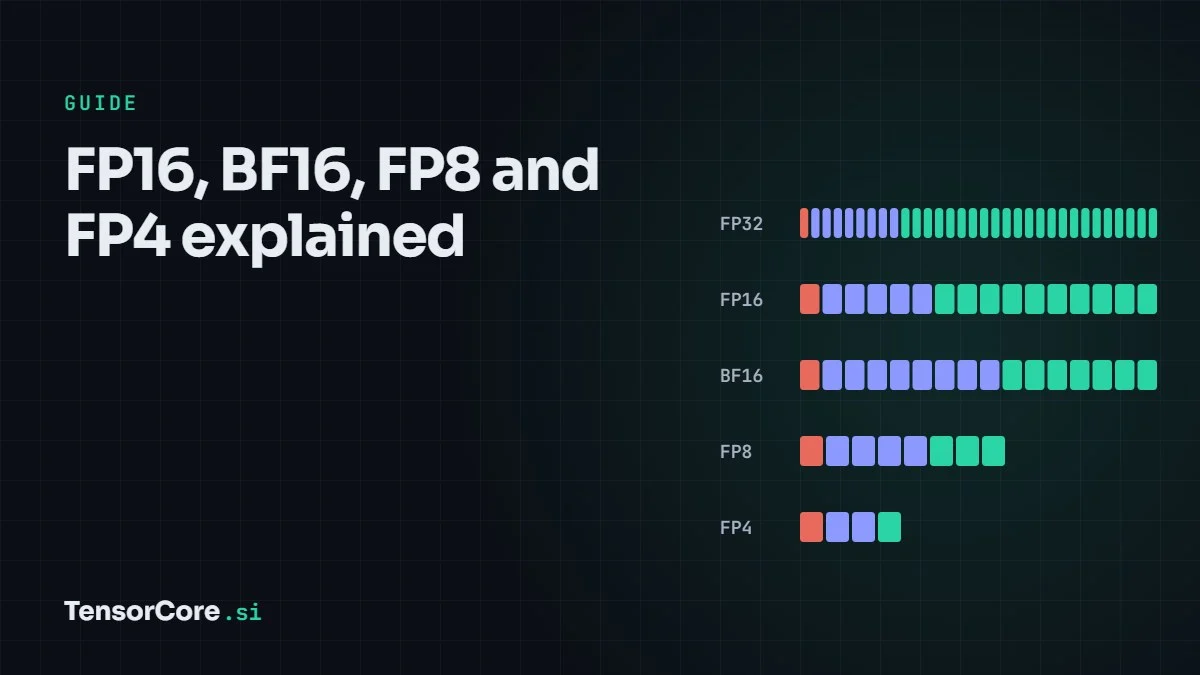
Every floating-point number splits its bits between an exponent (range) and a mantissa (precision). Halving the bits roughly doubles how fast a Tensor Core can work and halves the memory a model needs. AI tolerates this because small rounding errors average out, and because the running totals are still kept in FP32.
How a floating-point number works
A floating-point number is stored in three parts, like scientific notation in binary: a sign bit, an exponent that sets the scale (the power of two), and a mantissa that holds the significant digits. The value is roughly ±1.mantissa × 2exponent − bias.
More exponent bits give more range, meaning you can store very large and very small numbers. More mantissa bits give more precision, meaning finer steps between neighbouring values. A format's name such as E4M3 just says how many bits it gives each part: 4 exponent bits and 3 mantissa bits, plus a sign bit.
The formats side by side
| Format | Bits | Sign / exponent / mantissa | Largest value | First Tensor Core support |
|---|---|---|---|---|
| FP32 | 32 | 1 / 8 / 23 | ≈ 3.4 × 10³⁸ | Accumulator since Volta |
| TF32 | 19 | 1 / 8 / 10 | ≈ 3.4 × 10³⁸ | Ampere (2020) |
| FP16 | 16 | 1 / 5 / 10 | 65,504 | Volta (2017) |
| BF16 | 16 | 1 / 8 / 7 | ≈ 3.4 × 10³⁸ | Ampere (2020) |
| FP8 E5M2 | 8 | 1 / 5 / 2 | 57,344 | Hopper (2022) |
| FP8 E4M3 | 8 | 1 / 4 / 3 | 448 | Hopper (2022) |
| FP6 E3M2 / E2M3 | 6 | 1 / 3 / 2 or 1 / 2 / 3 | 28 / 7.5 | Blackwell (2024) |
| FP4 E2M1 | 4 | 1 / 2 / 1 | 6 | Blackwell (2024) |
FP4 is so small that you can list every positive value it can hold: 0, 0.5, 1, 1.5, 2, 3, 4 and 6. Notice how the gaps double as numbers grow. That pattern is true of every floating-point format; FP4 just makes it obvious.
Try it: round a number into every format
Live tool: round a number into each format
| Format | Stored value | Error | Relative error |
|---|
Round-to-nearest-even, saturating at each format's largest value, with no block scaling. FP4 is E2M1, so its largest value is 6.
Try 2.6. FP4 stores it as 3, an error of about 15%. Try 70000: FP16 saturates at 65,504 because it has only 5 exponent bits, while BF16 handles it easily. That single difference is why BF16 replaced FP16 for most training.
FP16 vs BF16
Both use 16 bits, but they split them differently. FP16 has 10 mantissa bits, so it is more precise, but its 5-bit exponent overflows above 65,504 and loses tiny values below about 6 × 10⁻⁸. Training in FP16 therefore needs loss scaling: multiply the loss by a large factor so small gradients do not round to zero, then divide it back out.
BF16 (brain floating point, from Google) keeps FP32's 8-bit exponent and drops to 7 mantissa bits. It covers the same range as FP32, so loss scaling is rarely needed, and converting from FP32 is just dropping bits. Most large models today are trained in BF16 or a BF16/FP8 mix.
TF32: the free speed-up
TensorFloat-32, added in Ampere, combines FP32's 8-bit exponent with FP16's 10-bit mantissa. Code that asks for FP32 matrix multiplication can run on Tensor Cores in TF32 without changes. On A100 that meant 156 TFLOPS dense instead of 19.5 TFLOPS. The trade-off is precision: about three decimal digits instead of seven, which is usually fine for neural networks and is an opt-in setting in recent PyTorch versions.
FP8: two flavours
Hopper introduced two 8-bit formats. E4M3 has more precision and tops out at 448, so it suits weights and activations in the forward pass. E5M2 has more range, up to 57,344, which suits gradients in the backward pass. FP8 math runs at twice the FP16 rate on Hopper and Blackwell.
With so little range, FP8 needs scaling factors. Before a tensor is converted, it is multiplied by a scale that maps its largest value near the top of the format, and the scale is stored separately. NVIDIA's Transformer Engine tracks these scales automatically, layer by layer.
FP4, FP6 and microscaling
At 4 bits, one scale for a whole tensor is no longer enough: a single large value would crush everything else to zero. The fix is microscaling. Values are grouped into small blocks, and each block gets its own scale.
- MX formats (an Open Compute Project standard) use blocks of 32 values sharing one 8-bit power-of-two scale: MXFP8, MXFP6 and MXFP4.
- NVFP4, NVIDIA's format for Blackwell, uses smaller blocks of 16 values with a more precise FP8 (E4M3) scale per block, plus one FP32 scale per tensor. Smaller blocks and finer scales keep more accuracy.
Blackwell Tensor Cores apply these block scales in hardware as part of the matrix multiplication. That is how a B200 reaches 9 PFLOPS of dense FP4 while keeping inference accuracy close to FP8 on many models.
What about INT8?
INT8 stores whole numbers from −128 to 127 with one scale factor, so every step is the same size. It has been supported on Tensor Cores since Turing and is still widely used for inference. FP8 handles values of very different sizes better, because its steps grow with the number, so it has replaced INT8 in many transformer deployments. In the TensorCore.si Challenge you can practise INT8 quantization by hand.
How much memory each format saves
| Format | Bytes per parameter | 70B-parameter model | 405B-parameter model |
|---|---|---|---|
| FP32 | 4 | 280 GB | 1,620 GB |
| BF16 / FP16 | 2 | 140 GB | 810 GB |
| FP8 / INT8 | 1 | 70 GB | 405 GB |
| FP4 | 0.5 | 35 GB (+ about 4.4 GB of NVFP4 scales) | 203 GB (+ about 25 GB of scales) |
The AI Model Explorer does this calculation for real models and shows how many GPUs each format needs.
Which format for which job
- Accumulation: FP32, almost always.
- Training: BF16 is the default; FP8 for the matrix multiplications on Hopper and Blackwell when the software stack supports it.
- Inference on Hopper: FP8, or INT8.
- Inference on Blackwell: FP8, or NVFP4 for the highest throughput and smallest memory footprint.
- Scientific computing: FP64, which data-center Tensor Cores have accelerated since Ampere.
New to the terms? See the glossary, or go back to the basics in What is a Tensor Core?


Leave a Reply